> ## Documentation Index
> Fetch the complete documentation index at: https://docs.prompteus.com/llms.txt
> Use this file to discover all available pages before exploring further.
# Introduction to Neurons
> Welcome to the world of Neurons! In Prompteus, Neurons are the foundational elements for building and managing your AI integrations.
Neurons are serverless functions you design with a visual editor, and they control how your requests flow to AI models. Each Neuron is deployed as a secure API endpoint, and can be called from any application.
You can create as many Neurons as you want in your Prompteus account, and Neurons can be chained together to form more complex workflows.
## Editing Neurons
Editing Neurons is done through the [Prompteus Dashboard](https://dashboard.prompteus.com). Once your account and organization are setup, you can create a Neuron from the [Neurons page](https://dashboard.prompteus.com/neurons).
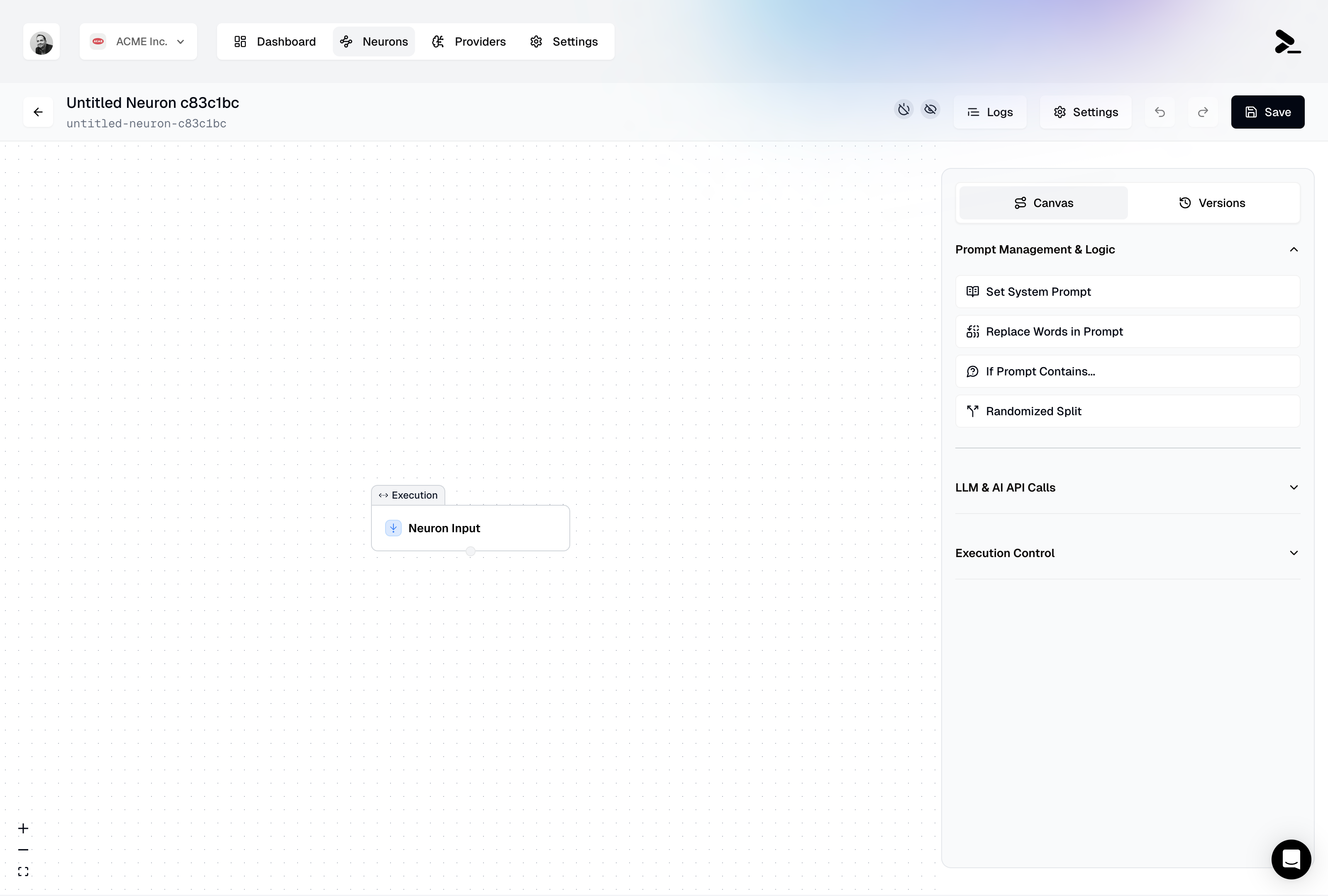 When you create a new Neuron, you will be presented with the Neuron workflow editor.
## Deploying Neurons
Before being able to call your Neurons through their API endpoint, you need to deploy your Neuron, and configure their access settings. Learn more about [version management and deployment](/neurons/editor/version-management).
## Calling a Neuron
Each Neuron can be called from a unique API URL. Your Neuron API URL is visible in the [Neuron Settings](/neurons/settings), and is generated from your organization's slug and the Neuron's slug. You can manage your organization's slug in the [Team Settings](/features/settings/team#managing-organization-details).
```bash theme={null}
https://run.prompteus.com//
```
In its simplest form, you can call your Neuron by sending a POST request to the API URL:
```bash curl theme={null}
curl -X POST https://run.prompteus.com// \
-H "Content-Type: application/json" \
-d '{"input": "What is the meaning of life?"}'
```
```javascript Fetch (JavaScript) theme={null}
const response = await fetch("https://run.prompteus.com//", {
method: "POST",
body: JSON.stringify({ input: "What is the meaning of life?" }),
});
```
```python Python theme={null}
import requests
response = requests.post(
"https://run.prompteus.com//",
json={"input": "What is the meaning of life?"}
)
print(response.json())
```
```typescript TypeScript SDK theme={null}
import { Prompteus } from '@prompteus-ai/neuron-runner';
const client = new Prompteus();
const response = await client.callNeuron(
'',
'',
{ input: 'What is the meaning of life?' }
);
```
For detailed information about calling Neurons, including authentication, error handling, and advanced options, see our [API documentation](/neurons/api).
We also provide an official TypeScript SDK (`@prompteus-ai/neuron-runner`) that offers a more convenient way to integrate with Neurons, including type safety and built-in error handling. See the [SDK section](/neurons/api#typescript-sdk) of our API documentation for installation and usage details.
Every call to a Neuron is considered a **Neuron Execution**, which is the fundamental unit of cost in Prompteus. The first 50,000 executions are free every month, and every additional 100,000 executions costs \$5.00.
When you create a new Neuron, you will be presented with the Neuron workflow editor.
## Deploying Neurons
Before being able to call your Neurons through their API endpoint, you need to deploy your Neuron, and configure their access settings. Learn more about [version management and deployment](/neurons/editor/version-management).
## Calling a Neuron
Each Neuron can be called from a unique API URL. Your Neuron API URL is visible in the [Neuron Settings](/neurons/settings), and is generated from your organization's slug and the Neuron's slug. You can manage your organization's slug in the [Team Settings](/features/settings/team#managing-organization-details).
```bash theme={null}
https://run.prompteus.com//
```
In its simplest form, you can call your Neuron by sending a POST request to the API URL:
```bash curl theme={null}
curl -X POST https://run.prompteus.com// \
-H "Content-Type: application/json" \
-d '{"input": "What is the meaning of life?"}'
```
```javascript Fetch (JavaScript) theme={null}
const response = await fetch("https://run.prompteus.com//", {
method: "POST",
body: JSON.stringify({ input: "What is the meaning of life?" }),
});
```
```python Python theme={null}
import requests
response = requests.post(
"https://run.prompteus.com//",
json={"input": "What is the meaning of life?"}
)
print(response.json())
```
```typescript TypeScript SDK theme={null}
import { Prompteus } from '@prompteus-ai/neuron-runner';
const client = new Prompteus();
const response = await client.callNeuron(
'',
'',
{ input: 'What is the meaning of life?' }
);
```
For detailed information about calling Neurons, including authentication, error handling, and advanced options, see our [API documentation](/neurons/api).
We also provide an official TypeScript SDK (`@prompteus-ai/neuron-runner`) that offers a more convenient way to integrate with Neurons, including type safety and built-in error handling. See the [SDK section](/neurons/api#typescript-sdk) of our API documentation for installation and usage details.
Every call to a Neuron is considered a **Neuron Execution**, which is the fundamental unit of cost in Prompteus. The first 50,000 executions are free every month, and every additional 100,000 executions costs \$5.00.